Behavior Status3.5.0
Publisher Description
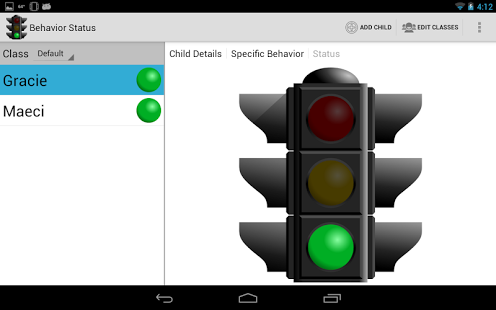
Behavior Status is aimed at Parents and Teachers alike. Use it to record the daily actions of your child or an entire classroom. Childhood behavior is easily recorded using the simple Green/Yellow/Red stoplight mechanism currently employed by many schools, day cares and parents alike. Also works great for use in teaching kids with Autism or ADD/ADHD.
The information recorded can be viewed over time on a child by child basis using the color coded calendar view. Use this history information to help encourage good behavior with simple rewards. Recent updates added the ability to store notes as you make status changes and better support for teachers.
Free Version Features:
- Track Overall Behavior
- Basic Status Input Red/Yellow/Green
- Alternate Status Input which supports up to 5 colors.
- Record Notes throughout the day
- Neutral Status
- Email Status Reports
- Easily correct past days
- Group Children by Class
- Easy Add/Edit Child, Classes, etc
- Sort Problem Kids to the Top
- 24 Hour Time Option
- Home Screen Widget
- Checking for new blog posts on BehaviorStatus.com
- Specific Behavior Tracking
- Enable Specific Behavior Tracking by Child
- Add/Edit/Delete Specific Behaviors by Child
- Copy Specific Behaviors from one child to another
- Stats and Graphing
Features enabled by Donate Version:
- Disable Ads
About Behavior Status
The company that develops Behavior Status is Chris L. Bennett. The latest version released by its developer is 3.5.0. This app was rated by 7 users of our site and has an average rating of 2.1.
To install Behavior Status on your Android device, just click the green Continue To App button above to start the installation process. The app is listed on our website since 2013-08-06 and was downloaded 209 times. We have already checked if the download link is safe, however for your own protection we recommend that you scan the downloaded app with your antivirus. Your antivirus may detect the Behavior Status as malware as malware if the download link to com.chrislbennett.behaviorstatus is broken.
How to install Behavior Status on your Android device:
- Click on the Continue To App button on our website. This will redirect you to Google Play.
- Once the Behavior Status is shown in the Google Play listing of your Android device, you can start its download and installation. Tap on the Install button located below the search bar and to the right of the app icon.
- A pop-up window with the permissions required by Behavior Status will be shown. Click on Accept to continue the process.
- Behavior Status will be downloaded onto your device, displaying a progress. Once the download completes, the installation will start and you'll get a notification after the installation is finished.
Program Details
System requirements
Download information
Pricing
Version History
version 3.5.0
posted on 2013-08-06
Its long over due, but finally here is the new version of Behavior Status,- Redesigned to support Android 4.0 phones and tablets.,- Simpler user interface to eliminate confusion and hidden options,- Preparing for the future release to add online synchronization
version 3.0.1
posted on 2011-05-03
Several fixes and updates
